Friday, March 1, 2024

Deepl Translate

How to use translate with DeepL without payment
Limits: • Document (.docx or .pdf) can’t be larger than 5MB – typically about 110 pages and not more. First time only: Enable Developer Mode on Microsoft Word following the steps below:  on Mac: 1. On the Word menu, select Preferences. 2. Select Ribbon and Toolbar > Customize the Ribbon > Main Tabs. 3. Check Developer and select Save.  On Windows: On the File tab, go to Options > Customize Ribbon. Under Customize the Ribbon and under Main Tabs, select the Developer check box. 1. Translate Document on DeepL: Click on the button DeepL menu: documents from top bar. Browse the file, or drag and drop it in the left Translator window. Select the target language; and save into your preferred folder (eg: C:\Downloads\translatedITA.docx) 2. Open Translated Document in Word. (You will find a DeepL advertisement banner on header which you can’t edit or remove!) Save the file as .doc (eg: translatedITA.doc) and close Word. 3. Open translatedita.doc now and click on Developer on menu bar. Click on “Protect Form” with lock icon to unlock the protection of the document. Now you can right click on “DeepL Banner” on the header and delete the Bigger Deepl Banner! Right click again on remain “Translated with Deepl” banner and delete that as well. Now save the file as translatedita.docx to over-write the older banner-ridden file. Congrats! Now you have a translated document without paying DeepL!

Wednesday, February 7, 2024

கடவுள் பிஸ்னஸ் பார்ட்னர் - Business Parternship with God - Mendicante verso Dio

ிச்சைகாரன்:* சார்… எனக்கு திடீர் என்று வேலை போய்விட்டது. கடந்த ஒரு வருடமாக நான் வேறு வேலைக்கு முயற்சித்துக்கொண்டிருக்கிறேன். எதுவும் கிடைக்கவில்லை. உங்களைப் பார்த்தால் பெரிய மனிதர் போல இருக்கிறீர்கள். எனக்கு நீங்கள் ஒரு வேலை வாங்கிக்கொடுத்தால் பிச்சையெடுப்பதை விட்டுவிடுகிறேன். 🌼“உனக்கு நிச்சயம் உதவ வேண்டும் என்று தோன்றுகிறது. ஆனால், வேலை வாங்கி தரும் எண்ணம் எனக்கில்லை. வேறு ஒன்றை மனதில் வைத்திருக்கிறேன்.” 🌼“வேறு ஒண்ணா…? எதுவா இருந்தாலும் சரி என் பிரச்சினை தீர்ந்தா போதும்” என்றான் பிச்சைக்காரன். 🌼“உன்னை என்னுடைய பிஸ்னஸ் பார்ட்னர் ஆக்கப்போகிறேன்.” 🌼“என்னது பிஸ்னஸ் பார்ட்னரா...?"😱 🌼ஆமாம்… எனக்கு சொந்தமாக பல நூறு ஏக்கரில் விவசாய நிலம் இருக்கிறது. அதில் விளையும் தானியங்களை நீ சந்தையில் விற்கலாம். உனக்கு கடை வைக்க இடம், தானியம் உட்பட அனைத்தையும் தருகிறேன். நீ செய்யவேண்டியதெல்லாம் ஒன்று தான். தானியங்களை விற்று லாபத்தில் எனக்கு பங்கு தர வேண்டும். அவ்வளவு தான்!” 🌼“முதலீடே செய்யாமல் இப்படி ஒரு வாய்ப்பா? கடவுள் கண்ணை தொறந்துட்டாண்டா குமாரு” என்று பிச்சைக்காரன் மனம் குதூகலத்தில் மூழ்கியது. 🌼“சார்… அது வந்து… லாபத்தை நாம எப்படி பிரிச்சிக்கப்போறோம்…? உங்களுக்கு 90% எனக்கு 10% ஆ? இல்லை உங்களுக்கு 95% எனக்கு 5% ஆ? எப்படி??” ஆர்வத்தோடு கேட்டான்.😍 🌼“இல்லை… நீ 90% எடுத்துகிட்டு எனக்கு 10% கொடுத்தா போதும்” 🌼அதைக்கேட்ட பிச்சைகாரனுக்கு ஒரு கணம் பேச்சே வரவில்லை.🤐 🌼“என்ன சார் சொல்றீங்க?” நம்பமுடியாமல் கேட்டான்.😳 🌼“ஆமாம்ப்பா உனக்கு 90% எனக்கு ஜஸ்ட் 10% போதும். எனக்கு பணம் 💸 தேவையில்லை. அது நீ நினைக்கிறதைவிட நிறைய என்கிட்டே இருக்கு. இந்த 10% கூட நான் கொடுக்கச் சொல்றது என் தேவைக்காக இல்லை. உனக்கு நன்றியுணர்ச்சி என்னைக்கும் இருக்கனுமேங்குறதுக்காகத் தான்.” 🌼“எனக்கு வாழ்க்கையையே பிச்சை போட்ட தெய்வமே… நான் உனக்கு என்னென்னைக்கும் நன்றிக் கடன்பட்டிருக்கேன்” அடுத்தநொடி பிச்சைக்காரன் அந்த செல்வந்தரின் கால்களில் விழுந்துவிட்டான். 🌼இவர்கள் செய்துகொண்ட ஒப்பந்தப்படி அனைத்தும் நடைபெற துவங்கியது. பிச்சைக்காரனிடம் செல்வம் குவிய ஆரம்பித்தது. முதலில் பணம் ஆயிரங்களில் புரளத் துவங்கி அடுத்த சில வாரங்களில் அது லட்சங்களை எட்டியது. 🌼ஆனால் ஒரு கட்டத்தில் பிச்சைக்காரன் தனக்கு இந்த வாழ்க்கையை அளித்த அந்த வள்ளலை மறந்தே விட்டான். 🌼புத்தம் புதிய ஆடைகளை உடுக்கத் துவங்கியவன் 👔👖, தான் கடைக்கு வந்து செல்வதற்கு ஒரு வாகனத்தை 🚗 வாங்கிவிட்டான். கழுத்தில் மைனர் செயின் அணிந்துகொண்டான். இரவு பகலாக லாபமே குறிக்கோள் என்று உழைத்தான். தானியங்களின் தரம் இவன் கடையில் நன்றாக இருந்தபடியால் விற்பனை நாளுக்கு நாள் அதிகரித்தது. ஒரு சில மாதங்கள் சென்றது. அதுவரை தனது பிஸ்னஸ் பார்ட்னரான அந்த செல்வந்தனின் பங்காக தினசரி 10% ஒதுக்கி வந்தவன் ஒரு கட்டத்தில் தனக்கு தானே கேட்டுக்கொண்டான்…. “என்னோட பார்ட்னருக்கு நான் ஏன் 10% கொடுக்கணும்? அவர் கடைக்கே வர்றதில்லையே. உழைப்பு எல்லாம் என்னோடது. இரவு பகலா நான் தான் வேலை செய்யுறேன்… இனி எனக்கே 100% லாபம்” என்று முடிவு செய்தான். 🌼அடுத்த சில நிமிடங்களில் செல்வந்தர் புதுப்பணக்காரனாகிவிட்ட பழைய பிச்சைக்காரனிடம் தனது லாபத்தின் பங்கைப் பெற கடைக்கு வந்தார்… “உழைப்பு எல்லாம் என்னோடது. அப்படியிருக்க உங்களுக்கு எதுக்கு நான் 10% தரனும்? எனக்கு தான் எல்லா லாபமும் சொந்தம்!” என்று ரூல்ஸ் பேசினான். 🌼அந்த செல்வந்தனின் இடத்தில் நீங்கள் இருந்தால் என்ன சொல்வீர்கள்? 🌼ஒரு செகண்ட் யோசியுங்களேன்….🤔 🌼 *இது தான் நமது எல்லார் வாழ்க்கையிலும் நடக்கிறது.* 🌼இறைவன் தான் பிஸ்னஸ் பார்ட்னர். நாம் தான் அந்த புதுப்பணக்காரன் (?!). 🌼இறைவன் நமக்கு பிச்சை போட்டது இந்த வாழ்க்கையை. ஒவ்வொரு நொடியை. நாம் விடும் ஒவ்வொரு மூச்சை. 🌼ஐம்புலன்களை நமக்கு கொடுத்து அவை ஒவ்வொன்றுக்கும் தனித்தனி ஆற்றல்கள் கொடுத்தார் இறைவன். அதுமட்டுமா? ஐம்புலன்கள் போதாது என்று கை, கால், இதயம், சிறுநீரகம், கல்லீரல் என விலை மதிக்கவே முடியாத நம் உடலுறுப்புக்கள் கொடுத்தார்.இப்படி இறைவன் நமக்கு கொடுத்தவற்றை பட்டியலிட துவங்கினால்… அது முடிவே இல்லாமல் தான் போய்கொண்டிருக்கும். 🌼இவ்வளவு தந்த அவருக்கு ஜஸ்ட் ஒரு 10% நேரத்தை தான் நாம் பகிர்ந்துகொள்ளவேண்டும் என்று அவர் எதிர்பார்க்கிறார். அது கூட அவரது தேவைக்காக அல்ல. அவர் தேவைகள் அற்றவர்.நமது நன்றியுணர்ச்சிக்காக அதை எதிர்பார்க்கிறார். அவர்மீது நாம் வைத்திருக்கும் அன்புக்காக. நன்றியுணர்ச்சி மட்டும் ஒருவரிடம் வந்துவிட்டால் அதற்கு பிறகு வாழ்க்கை எப்படி மாறும் தெரியுமா? 🌼இறைவனை வணங்குவதோ, ஆலயத்துக்கு செல்வதோ,இவை யாவும் செய்வது நமக்காக தான். நாம் நன்றியுடன் இருக்கிறோம் என்று காட்டத்தான். மற்றபடி இறைவனுக்கு அது தேவை என்பதால் அல்ல. ----------- Beggar:* Sir... I suddenly lost my job. I have been trying for another job for the past one year. Nothing found. You look like a great man. I will stop begging if you give me a job. 🌼“It seems you definitely want to help. But I have no intention of getting a job. I have something else in mind.” 🌼 “Something else…? Whatever it is, it is enough to solve my problem,” said the beggar. 🌼 “I'm going to make you my business partner.” 🌼"What business partner...?"😱 🌼Yes… I own several hundred acres of agricultural land. You can sell the grains grown in the market. I will give you everything including a place to store and grain. All you have to do is one thing. I want to sell the grain and give me a share in the profit. That's it!” 🌼“Is this an opportunity without investment? "Son, has God touched your eyes?" The beggar's mind was filled with joy. 🌼 “Sir… it comes… how are we going to divide the profit…? 90% for you and 10% for me? No. 95% for you and 5% for me? How??” He asked with interest.😍 🌼 “No… you just take 90% and give me 10%” Hearing that, the beggar was speechless for a moment.🤐 🌼 "What do you mean sir?" He asked in disbelief.😳 🌼 “Yes, 90% for you, just 10% for me. I don't need money 💸. I have more of it than you think. Even this 10% I am asking to give is not for my needs. It is because you want me to be grateful.” 🌼 "God who begged me for my life... I owe you everything." The next moment the beggar fell at the feet of the rich man. 🌼 Everything started to happen according to the agreement made by them. The beggar began to accumulate wealth. At first the money started flowing in thousands and in the next few weeks it reached lakhs. 🌼But at some point the beggar forgot that valla who gave him this life. 🌼He who started wearing brand new clothes 👔👖 bought a vehicle 🚗 to go to the shop. He wore a minor chain around his neck. He worked day and night with profit as the goal. As the quality of grains was good in his shop, the sales increased day by day. A few months passed. Till then he had been setting aside 10% daily as the share of his business partner, that rich man, at one point he asked himself…. “Why should I give my partner 10%? He never comes to the shop. All the work is mine. I will work day and night... I will make 100% profit from now on,” he concluded. 🌼In the next few minutes Selvandar came to the shop to get his share of the profit from the old beggar who had become a new rich man… “All the labor is mine. So why should I give you 10%? I own all the profits!” Rules spoke. 🌼What would you say if you were in that rich man's place? 🌼Think for a second….🤔 🌼 *This is what happens in all our lives.* 🌼God is the business partner. We are that newbie (?!). God has begged us for this life. Every second. Every breath we take. 🌼God gave us five senses and gave each of them separate powers. Is that all? If five senses are not enough, He has given us organs like hand, foot, heart, kidney and liver which cannot be valued. 🌼He expects us to share just 10% of his time given to him. Not even for his needs. He is undemanding and expects it for our gratitude. For the love we have for him. Do you know how life will change if only gratitude comes to one? 🌼Whether worshiping the Lord or going to the temple, all these things are done for us. Just to show that we are grateful. Not because God requires it otherwise. --------------- Mendicante:* Signore... ho perso improvvisamente il lavoro. Sto cercando un altro lavoro da un anno. Non abbiamo trovato nulla. Sembri un grand'uomo. Smetterò di mendicare se mi dai un lavoro. 🌼“Sembra che tu voglia assolutamente aiutare. Ma non ho intenzione di trovare un lavoro. Ho qualcos'altro in mente." 🌼 “Qualcos'altro...? Qualunque cosa sia, è sufficiente per risolvere il mio problema", disse il mendicante. 🌼 "Ti farò mio socio in affari." 🌼"Quale socio in affari...?"😱 🌼Sì... possiedo diverse centinaia di acri di terreno agricolo. Puoi vendere i cereali coltivati ​​sul mercato. Ti darò tutto, incluso un posto dove conservare e grano. Tutto quello che devi fare è una cosa. Voglio vendere il grano e darmi una parte del profitto. Questo è tutto!" 🌼“È un'opportunità senza investimenti? “Figliolo, Dio ha toccato i tuoi occhi?” La mente del mendicante era piena di gioia. 🌼 “Signore... arriva... come divideremo l'utile...? 90% per te e 10% per me? No. 95% per te e 5% per me? Come??" Ha chiesto con interesse.😍 🌼 “No… prendi solo il 90% e mi dai il 10%” Udendo ciò, il mendicante rimase per un momento senza parole.🤐 🌼 "Che cosa vuol dire, signore?" Chiese incredulo.😳 🌼 “Sì, il 90% per te, solo il 10% per me. Non ho bisogno di soldi 💸. Ne ho più di quanto pensi. Anche questo 10% che chiedo di dare non è per le mie esigenze. È perché vuoi che ti sia grato. 🌼 "Dio che mi ha implorato per la mia vita... ti devo tutto." Un attimo dopo il mendicante cadde ai piedi del ricco. 🌼 Tutto cominciò ad avvenire secondo l'accordo preso da loro. Il mendicante iniziò ad accumulare ricchezze. All'inizio il denaro cominciò ad affluire a migliaia e nelle settimane successive raggiunse i lakh. 🌼Ma ad un certo punto il mendicante dimenticò quella valla che gli aveva dato questa vita. 🌼Colui che ha iniziato a indossare vestiti nuovi di zecca 👔👖 ha comprato un veicolo 🚗 per andare al negozio. Portava una catenella minore al collo. Ha lavorato giorno e notte con l'obiettivo del profitto. Poiché la qualità dei cereali nel suo negozio era buona, le vendite aumentavano di giorno in giorno. Passarono alcuni mesi. Fino ad allora aveva accantonato ogni giorno il 10% come quota del suo socio in affari, quel riccone, a un certo punto si chiese…. “Perché dovrei dare al mio partner il 10%? Non viene mai al negozio. Tutto il lavoro è mio. Lavorerò giorno e notte... da ora in poi trarrò profitto al 100%”, ha concluso. 🌼Nei minuti successivi Selvandar venne al negozio per ritirare la sua parte del profitto dal vecchio mendicante che era diventato un nuovo ricco… “Tutto il lavoro è mio. Allora perché dovrei darti il ​​10%? Possiedo tutti i profitti! Le regole hanno parlato. 🌼Cosa diresti se fossi al posto di quell'uomo ricco? 🌼Pensaci un secondo….🤔 🌼 *Questo è ciò che accade nella vita di tutti noi.* 🌼Dio è il partner commerciale. Noi siamo quel principiante (?!). Dio ci ha implorato per questa vita. Ogni secondo. Ogni respiro che facciamo. 🌼Dio ci ha dato cinque sensi e ha dato a ciascuno di essi poteri separati. È tutto? Se cinque sensi non bastano, Egli ci ha dato organi come mani, piedi, cuore, reni e fegato che non possono essere valutati. 🌼Si aspetta che condividiamo solo il 10% del tempo che gli viene concesso. Nemmeno per i suoi bisogni. È poco esigente e lo aspetta per la nostra gratitudine. Per l'amore che abbiamo per lui. Sai come cambierà la vita se arriva solo la gratitudine? 🌼Che si tratti di adorare il Signore o di andare al tempio, tutte queste cose vengono fatte per noi. Giusto per dimostrare che siamo grati. Non perché Dio lo richieda altrimenti.

Thursday, December 28, 2023

How to rip a DVD with a Mac

How to rip even a copy proteced DVD with a mac https://www.makeuseof.com/how-to-rip-dvd-to-mac/

Friday, November 3, 2023

Spotify gratis!

https://guruhitech.com/come-avere-spotify-premium-gratis-su-smartphone-e-pc/ Come avere Spotify Premium gratis su smartphone e PC <
Si chiama Spotube ed è l’app multipiattaforma con tutte le funzioni di Spotify a pagamento! Di applicazioni che cercano di emulare Spotify ce ne sono a decine ma Spotube è senza dubbio quella che le batte tutte. Tanto per cominciare la puoi installare non solo su Android ma anche su Windows, macOS e addirittura su Linux. Spotube è infatti disponibile in tanti formati, ovvero .apk, .exe, .nupkg, .dmg, .deb, .AppImage e .targz. Restano fuori dai giochi naturalmente i dispositivi mobili di Apple (iPhone e iPad) dove, come sappiamo, l’installazione di app esterne allo store ufficiale è ancora un grosso problema.
Cos’ha di speciale Spotube? La meraviglia di questa applicazione è data non solo dalle tante interessanti funzionalità come ad esempio il download dei brani ma anche dal fatto che la puoi utilizzare con il tuo account Spotify. In parole povere, avere Spotube è quasi come avere Spotify Premium, ma in modo completamente gratuito! Inoltre la potrai utilizzare non solo sul tuo smartphone Android ma anche su qualsiasi PC. Naturalmente puoi creare le tue playlist, condividere i brani, modificare il tema grafico, la cartella di destinazione dei download e altro ancora. Come eseguire l’accesso con l’account Spotify L’app funziona a meraviglia su tutti i sistemi operativi che ho testato, ovvero Android, Windows e Linux. Rispetto alla versione per Android però c’è una differenza a cui dovrai prestare attenzione. Sebbene su Android il collegamento all’account Spotify sia molto semplice, nella versione desktop dovrai seguire un procedimento all’apparenza un tantino complicato. Su Android ti basta infatti inserire email e password del tuo account Spotify, o collegarlo al tuo account Facebook, Gmail o Apple.
Su PC dovrai invece inserire due codici: sp_dc sp_key
Non avevo mai sentito parlare di questi codici fino ad ora ma, in basso a destra, proprio sotto la voce “Submit“, c’è scritto “Follow along the Step by Step guide“. Cliccandoci su verrai quindi dirottato su un breve ma comprensibile tutorial che ti spiegherà come ottenere questi codici. Visto che ci siamo, ti spiego anch’io come fare: Entra nel sito open.spotify.com ed esegui l’accesso al tuo account Spotify. Ora clicca il tasto F12 della tastiera per entrare nella pagina “Ispeziona“. Nel tab centrale clicca su “Application” e nella colonna di sinistra seleziona “Cookies“.
Clicca su “https://open.spotify.com” ed ecco spuntare i codici di cui hai bisogno. Dovrai cliccarci su, copiarli uno ad uno e poi incollarli nella precedente tabella del login.
In questo passaggio fai attenzione perché il primo codice (sp_key) lo dovrai incollare nella seconda opzione (sp_key Cookie), mentre il secondo (sp_dc), andrà incollato nel primo (sp_dc Cookie). Una volta incollati i due codici, clicca su “Submit“.
E adesso goditi Spotube sul tuo computer! Come ottenere Spotube Siamo arrivati alla parte più interessante, ovvero quella per scaricare questa incredibile app multipiattaforma. Ebbene, tutti i file sono disponibili sul sito ufficiale seguente: spotube.netlify.app

Thursday, October 19, 2023

Samsung TV Plus -1500 channels via IPTV

Install on Firetv or any IPTV client Samsung TV Plus and enjoy 1500 IPTV channels for free! https://troypoint.com/samsung-tv-plus-on-firestick/ M3U8 link: https://i.mjh.nz/SamsungTVPlus/all.m3u8 Windows 10 - https://apps.microsoft.com/detail/9PJJ2NMBF0TR?hl=en-us&gl=US Skip to content TRENDING NOW: FEN Kodi Addon - Unlock Netflix Libraries - IPTV Guide TROYPOINT Jailbreak Firestick VPN Kodi IPTV Best APKs Streaming Sites Torrent Sites Tools Blog Insider Search Get 1,000+ Free Secret Apps on Firestick & Android TV/Google TV TV Channels Get Free Guide Now HomeIPTVHow to Watch Samsung TV Plus on Firestick & Fire TV (2023) How to Watch Samsung TV Plus on Firestick & Fire TV (2023) August 8, 2023 / IPTV, Streaming Apps samsung tv plus on firestick The following tutorial will provide you with step-by-step instructions to watch Samsung TV Plus on Firestick/ Fire TV. Samsung TV Plus is a Free IPTV Service that carries hundreds of live channels for streaming. Unfortunately, it is currently not available for installation on Amazon Firestick & Fire TV devices. Luckily, we can still access these channels with a Video Player or IPTV Player. The Amazon Firestick is the most popular media device available today due to its low price point and “jailbreaking” abilities. How to Unlock Your Firestick Device Users can also watch Samsung TV Plus on a Firestick via a web browser such as Google Chrome. We provide step-by-step instructions for both methods which you can find below. Oftentimes, Firestick owners can access applications not available in the Amazon App Store by sideloading the APK. However, Samsung has blocked access to its APK on Firestick and Fire TV devices which means we must use a workaround. In the guide below, we are using a Fire TV Stick 4K Max. However, this will also work for any variation of Fire TV including Firestick Lite and Fire TV Cube. Those using Android devices such as NVIDIA SHIELD, MECOOL, or Chromecast with Google TV can find Samsung TV Plus in the Google Play Store. Samsung TV Plus – Google Play Table of Contents [Show] How to Watch Samsung TV Plus on Firestick & Fire TV 1 – Install IPTV Smarters Pro In this guide, we will use IPTV Smarters to watch Samsung TV Pus on Firestick. However, other Players such as TiviMate, Smart IPTV, and more will also work for this tutorial. 1. Install the Downloader app from your respective App Store (Amazon App Store or Google Play) and enable Unknown Sources within the settings of your streaming device. Install Downloader & Enable Unknown Sources YOU'RE BEING TRACKED... Your online activity is tracked by your government, Internet Service Provider, app/addon/IPTV devs and all websites through your identifying IP address Stream anonymously by using Surfshark VPN Your Current Identifying IP Address: 95.142.184.11 SAVE 85% ON SURFSHARK VPN + 2 FREE MONTHS Surfshark backs their service with a 30-day money back guarantee Use your account on unlimited devices & share with family members HURRY! SALE ENDS SOON Claim Surfshark VPN Discount 2. Launch Downloader. launch downloader 3. Hover over the URL bar and click the select button on your remote to open the keyboard. click select button on remote to launch url bar 4. Type the Downloader Code for the TROYPOINT Toolbox which is 250931 and click Go. type downloader code for troypoint toolbox 5. You will then see a redirect page. redirect page for troypoint toolbox 6. This brings you to the TROYPOINT Toolbox home screen. troypoint toolbox home screen 7. Scroll down to find IPTV Smarters Pro and click Download. click download for iptv smarters samsung tv plus 8. Wait for the application to download. wait for iptv smarters to download for samsung tv plus 9. Click Install. Get 1,000+ Free Secret Apps for Fire TV / Android TV TROYPOINT Secret Apps Install Secret Apps on Fire TV/Android TV! Instructions for installing secret apps will be immediately delivered to your inbox. We won't send you spam. Unsubscribe at any time. click install for iptv smarters samsung tv plus on firestick 10. You will then encounter IPTV Smarters Pro Ready to launch! message. iptv smarters pro ready to launch 11. Click Open. click open for samsung tv plus with iptv smarters Mint Mobile $15 Per Month 2 – Integrate Samsung TV Plus M3U URL With IPTV Smarters now installed on our device, we can integrate the Samsung TV Plus M3U for live channels. 1. After opening IPTV Smarters, select TV and click Save. select tv and click save 2. Choose Load your Playlist or File/URL. choose load your playlist or file/url 3. Click Allow. click allow for samsung tv plus on firestick 4. Click to select Playlist Name. click playlist name for samsung tv plus 5. Type STVPlus or other name of your choice and click Next. type stvplus for samsung tv plus on firestick 6. Select M3U URL for Playlist Type. select M3U URL for samsung tv plus 7. Click Input m3u line. click input m3u line 8. Type the following URL Address exactly as it is shown here: https://i.mjh.nz/SamsungTVPlus/all.m3u8 and click Next. Type the following URL Address exactly as it is shown here: https://i.mjh.nz/SamsungTVPlus/all.m3u8 and click Next. 9. Click Add User. click add user 10. You will then encounter User added successfully! message. user added succesfully for samsung tv plus on firestick 11. Select Live TV. select live tv 12. You can now access Samsung TV Plus Channels on Firestick or Fire TV. Enjoy! samsung tv plus channels Enjoy! Users can also access Samsung TV Plus on Firestick using a Web Browser. Follow the guide below if you prefer to access Samsung TV Plus on Firestick via browser. Samsung TV Plus on Firestick via Web Browser Using a web browser on Firestick is a fabulous way to access Free Movie Websites, Sports Streaming Sites, and more. These devices come with Amazon Silk Browser pre-installed which works perfectly for tons of web browsing. Unfortunately, it does not work with the Samsung TV Plus Official Website. We suggest installing another browser such as Google Chrome to stream these live channels on your device. Google Chrome on Firestick NOTE: Some browsers may require Mouse Toggle on Firestick for full navigation features. 1. Launch Google Chrome or other Web Browser and go to samsungtvplus.com. samsungtvplus.com for samsung tv plus on firestick 2. Click Agree. click agree for samsung tv plus on firestick 3. You can now access Samsung TV Plus on Firestick for live streaming. samsung tv plus on firestick Enjoy! Samsung TV Plus Channels There are tons of channel options available via Samsung TV Plus and are absolutely free. These are available in numerous categories including News & Opinion, Entertainment, Crime, Sports, Reality, Movies, and more. Some of the most popular options include: PBS Kids ChiveTV Kitchen Nightmares MTV Pluto TV Tastemade Outdoor America Pac 12 Insider bein Sports Xtra Stadium Court TV VICE ET Live Cheddar ABC News Live CBS News and more Kodi users can install the Samsung TV Plus Kodi Addon for access to these channels on any Kodi device. For more streaming options, check out our popular resource guides below. Best Streaming Apps Best Firestick Apps Kodi Addons Kodi Builds

Monday, November 28, 2022

Install Windows 11 without TPM 2.0


How to install Windows 11 without TPM 2.0

Ashwin
Oct 5, 2021
Updated • Oct 6, 2021
Windows 11 Help
|
12

In case you missed it, Windows 11 has been officially released a day earlier than anticipated. You may be looking for a way to upgrade to the OS. There are several ways to download Windows 11. That's fine if you have a relatively modern computer. But the setup will run a check to see if your device is compatible with the new operating system.
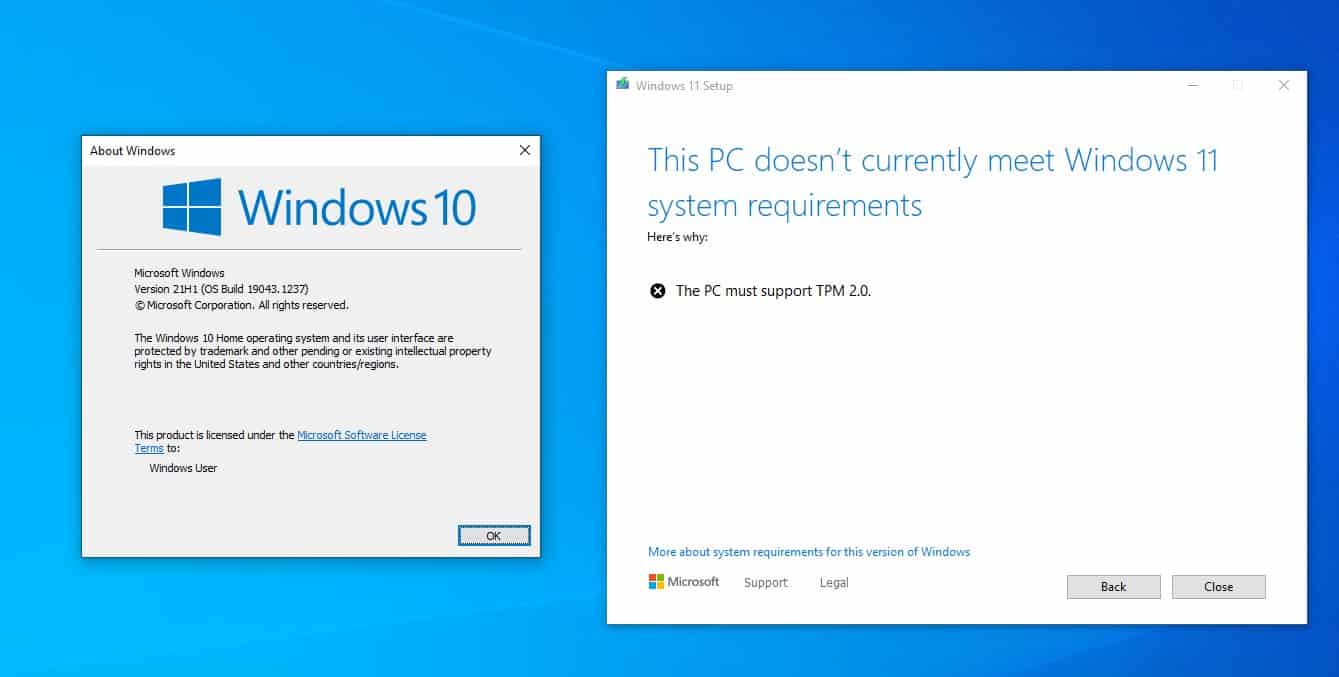
How to bypass TPM 2.0 requirement to install Windows 11

One of Windows 11's requirements is TMP 2.0 (Trusted Platform Module), it is a component that is present in Intel 8th generation CPUs, and AMD Ryzen 2nd-gen (2000 or above). If you have an older processor, it won't be compatible with the new OS, at least that's what the installer will tell you and the process fails.

Tip: find out whether your computer is compatible with Windows 11 using Microsoft's PC Health Check app.

Microsoft isn't saying that older processors won't be able to run Windows 11, just that it won't support the systems officially. So in reality, you can use Windows 11 on old computers. I've been using it on my free VMWare Workstation sans the TPM option, since the first build was leaked. Recent insider builds however blocked the installation due to the TPM check, but I bypassed this requirement quite easily.
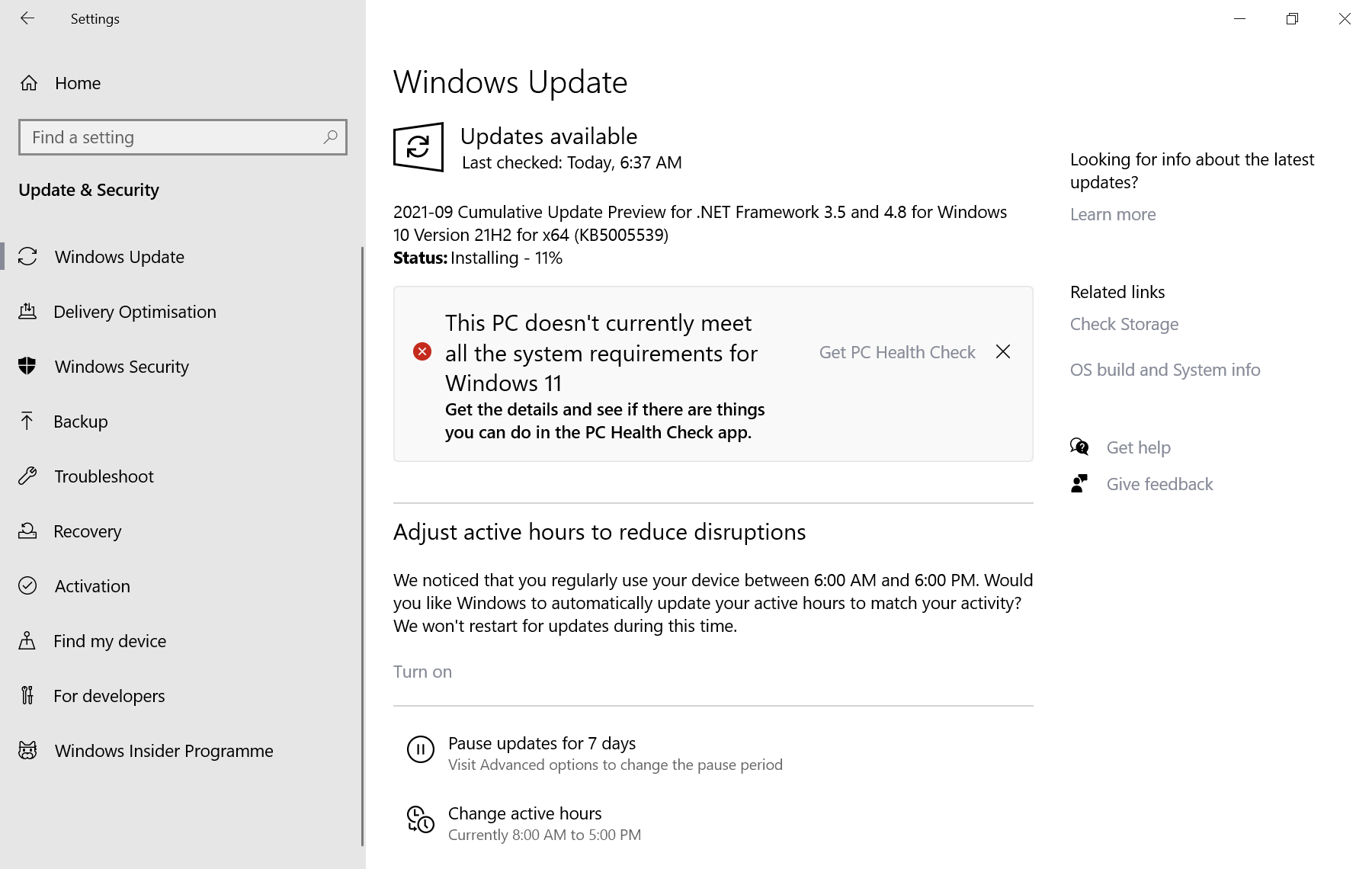
this pc doesn't currently meet all the system requirements for windows 11

Note: Windows Update displays a notification if the device is not compatible with Windows 11. It states the following: This PC doesn't currently meet all the system requirements for Windows 11. The notification links to Microsoft's PC Health Check tool, which offers more details on the incompatibilities.

You will need a copy of Windows 11, if you don't have one get the ISO, before following the steps below.  Here's how you can download Windows 11 safely.

Install Windows 11 on devices without TPM

Option 1 - Universal MediaCreationTool Wrapper

Note: Microsoft confirmed the bypass method to install Windows 11 that the tool uses officially.

1. Download the tool (use the download as ZIP button) and extract the archive's contents to a folder.

2. Open the directory, and select the file named Skip_TPM_Check_on_Dynamic_Update.cmd.

3. Right-click on it and select run as administrator.
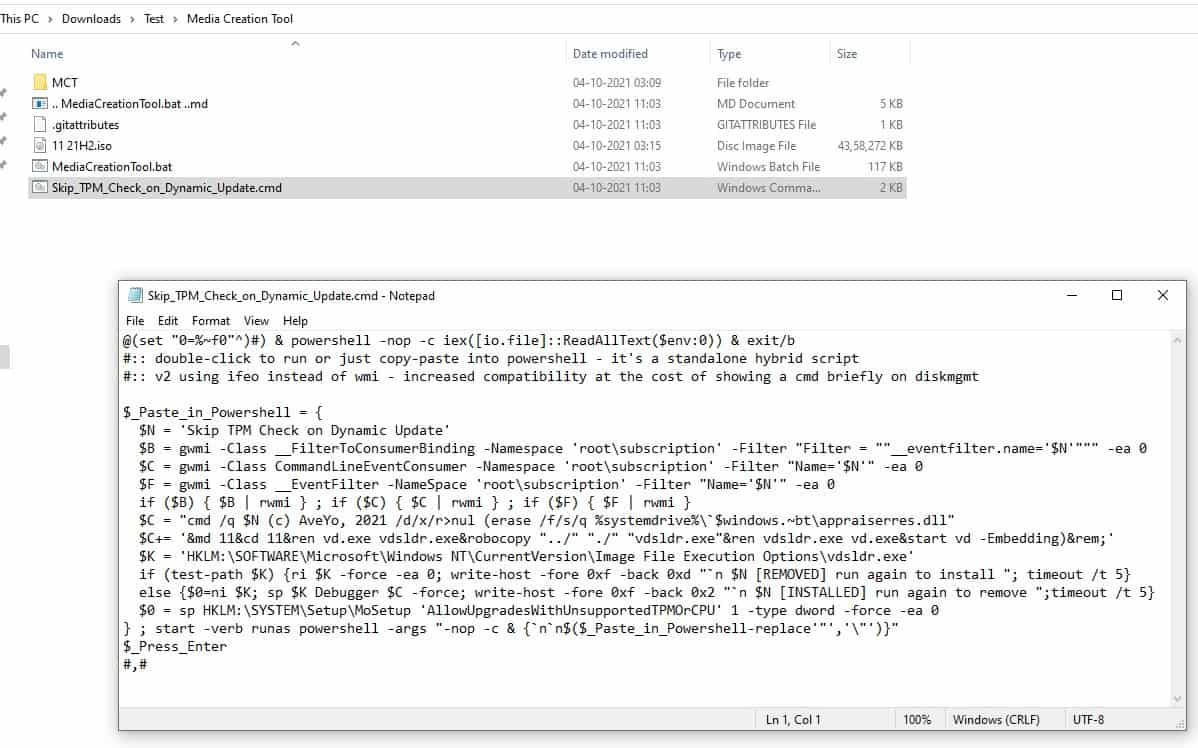
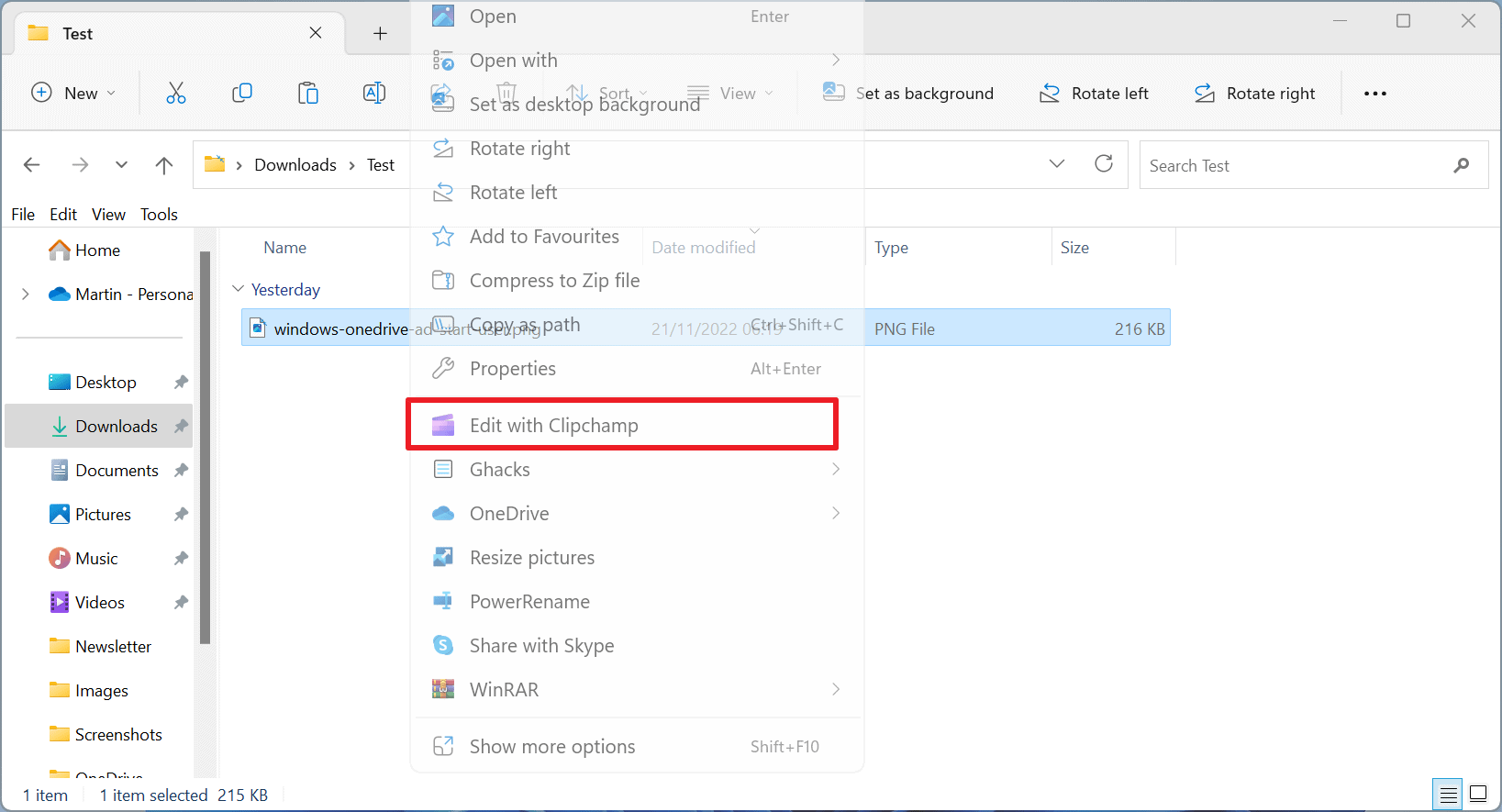
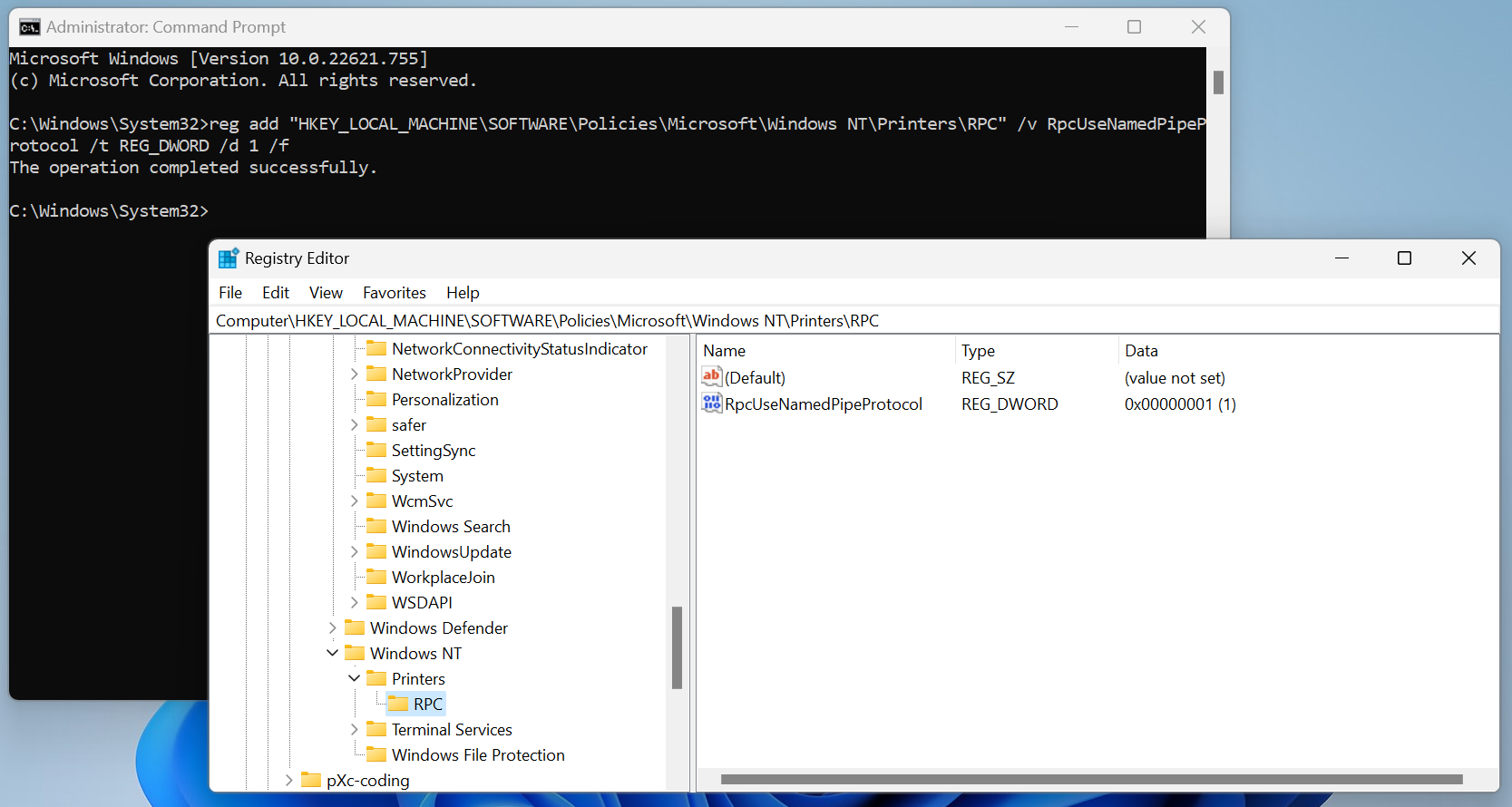
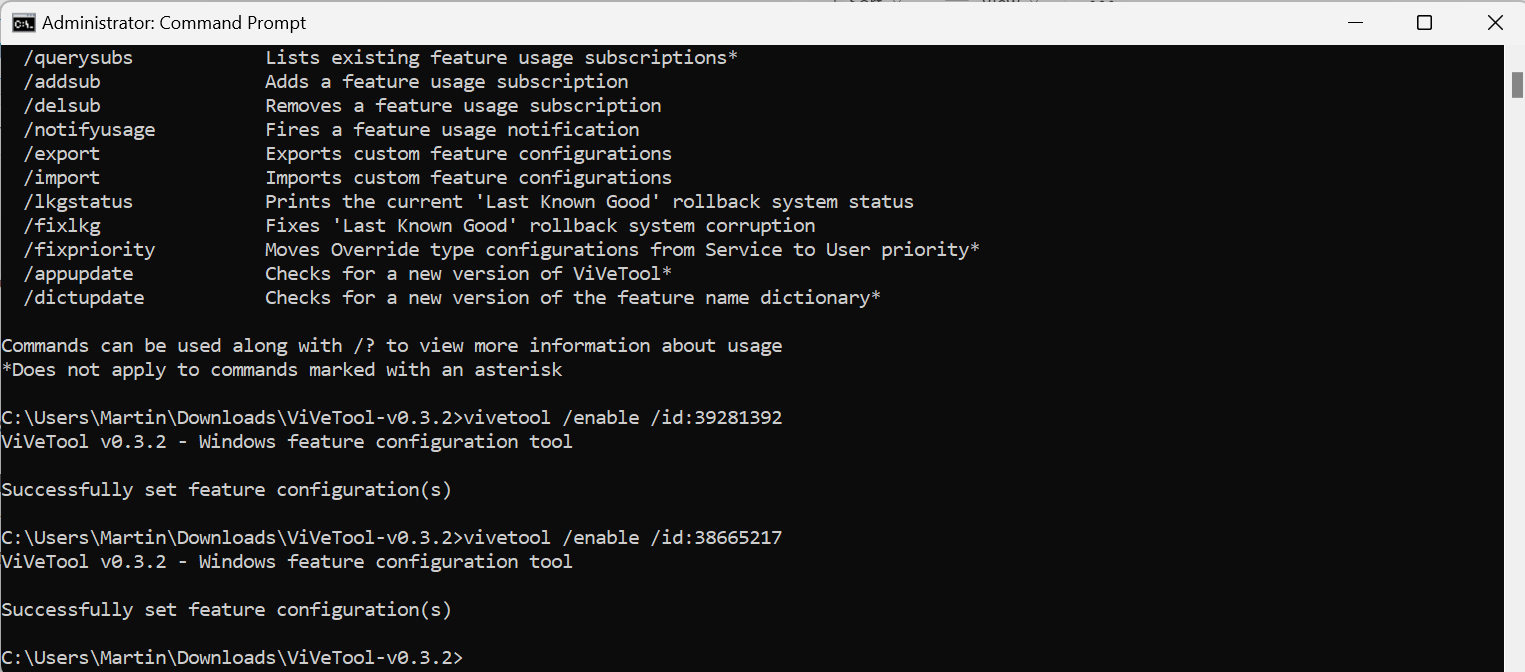
How to install Windows 11 without TPM 2.0

The command essentially does 2 things: it deletes a file called "appraiserres.dll", and creates a registry key that allows the installation of Windows 11 without TPM 2.0. This is by far the simplest method, and the one we recommend. Martin has written an article about the tool, which you can read for reference. It includes a wrapper for Microsoft's official Media Creation Tool as well, and you may run it to install Windows 11 using it on the device you are using.

Option 2 - Delete the Appraiser files

1. Mount the Windows 11 ISO in Explorer.

2. Copy the image's contents to a folder.

3. Navigate to the Sources folder, and delete the files named appraiser.dll and appraiser.sdb files.
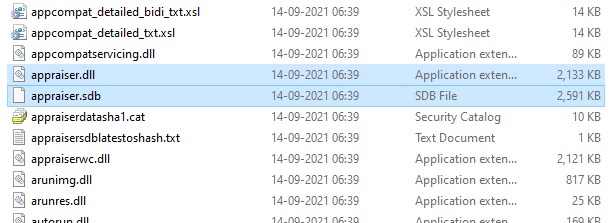
Windows 11 Delete appraiser files

Run the set-up, and it should bypass the TPM 2.0 check. If it still doesn't work, check the C:\$WINDOWS.~BT\Sources directory on your computer's drive, to see if it has the two files mentioned above, and delete them. This is the method that I used for upgrading my VM install of Windows 11 to a newer build.

Option 3 - Using Windows 10's files to install Windows 11

You will need an ISO for Windows 10, as well as one for Windows 11 for this method.
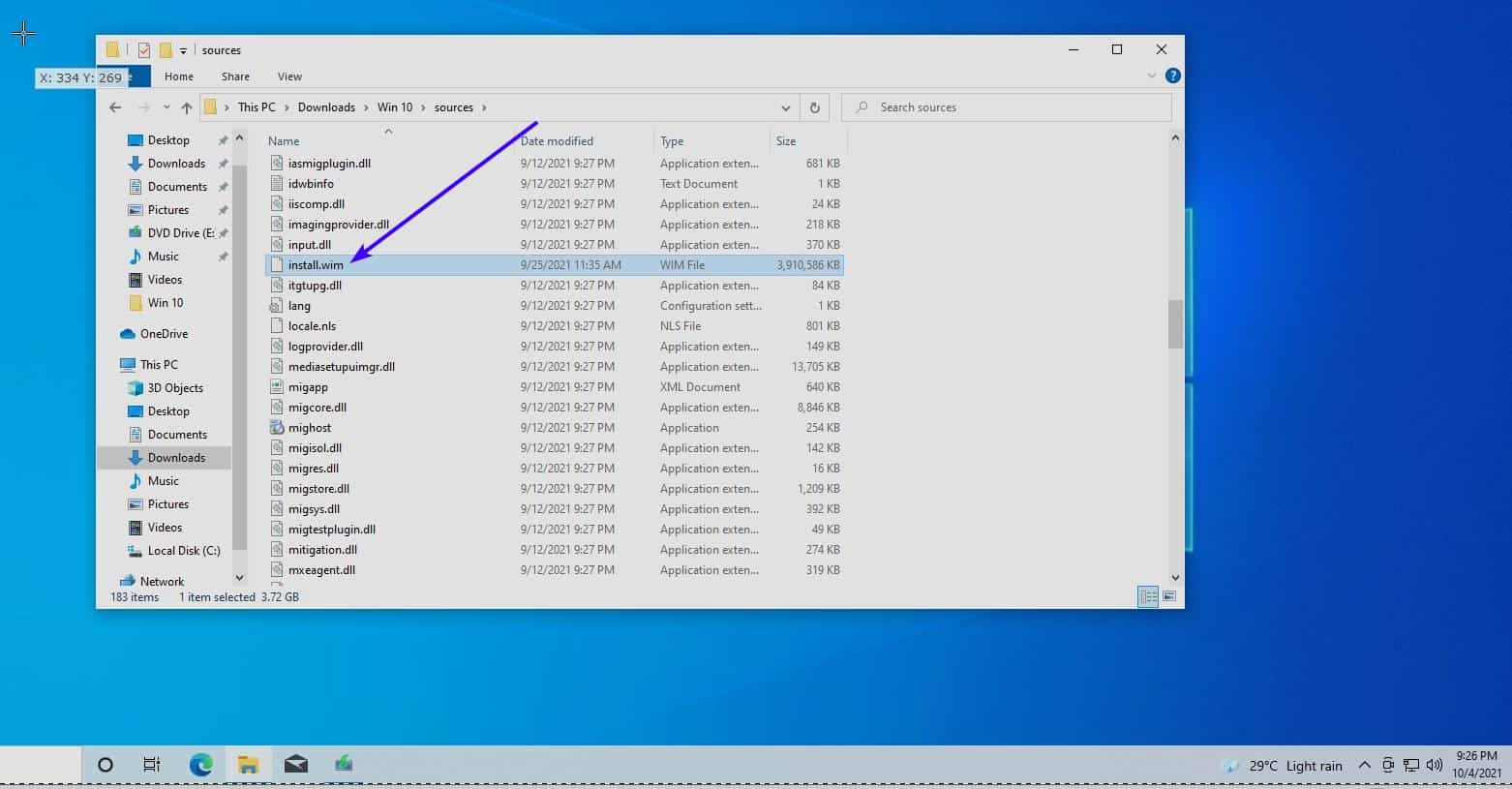
win 11 using win 10 install files

1. Open the Windows 10 ISO, and copy all the files in the source folder, except for the file named Install.ESD , to a separate folder.

2. Load the Windows 11 image in Explorer, copy the Install.WIM file to the folder where you copied the other content to.

3. Start the Windows 10 setup file. Yes it may sound crazy, but it tricks the setup into using Windows 10's requirements instead of Windows 11's, allowing your computer to pass the check.
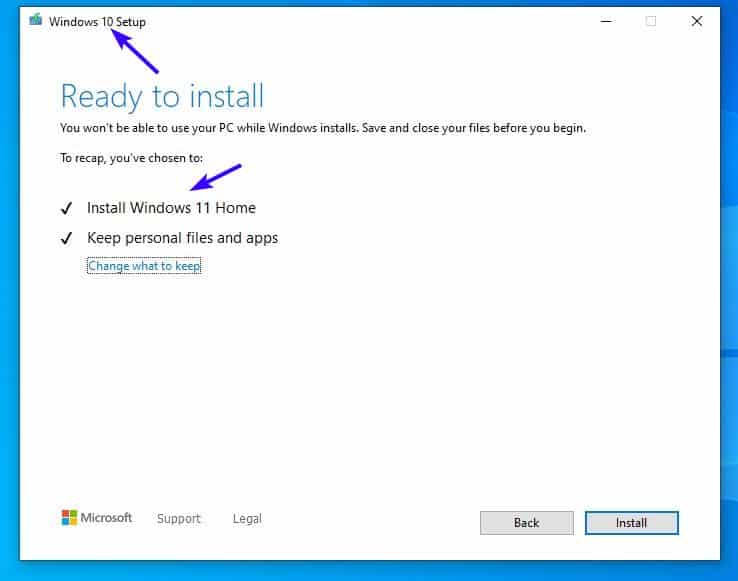
Install Windows 11 by replacing a Windows 10 file

I tested this in a new VM installation yesterday, and it still works.

Note: You need to have UEFI BIOS and Secure Boot enabled on your computer to install the new OS.

Do you have a different way to bypass the TPM 2.0 requirement to install Windows 11?

Summary
Learn how to install Windows 11 without TPM 2.0
Article Name
Learn how to install Windows 11 without TPM 2.0
Description
Don't have a TPM 2.0 compatible PC? You can still install Windows 11 using these methods.
Author
Publisher
Ghacks Technology News
Logo
Advertisement

Comments

  1. has-anyone-tried-this said on October 5, 2021 at 10:43 am
    Reply

    Is it possible to use offline accounts at all on Windows 11 Home?

    If an online account is needed to register the installation, would it be possible to set it up, create an offline admin account, remove the online one and use the offline account for the reminder of the system’s life?

    1. Martin Brinkmann said on October 5, 2021 at 10:47 am
      Reply

      Yes, offline accounts are supported on Windows 11 Home. I have not tried it, but there are workarounds to set up an offline account during Windows 11 Home installations, see here for example: https://www.extremetech.com/extreme/326879-how-to-install-windows-11-home-with-a-local-account

  2. flagada said on October 5, 2021 at 2:23 pm
    Reply

    Hi, I use Winreducer to easily manage what I want to keep or remove from the original .iso, but also edit the register and preset the first launch so that it won’t force/push me to use an online account, cortana etc. I create my local account in advance. Maybe that can help you make some settings of your choice – to trick Windows 11 for example.

  3. djdeejay said on October 5, 2021 at 3:14 pm
    Reply

    Method with appraiser not working on final version.

  4. semce said on October 5, 2021 at 3:42 pm
    Reply

    I installed Win 11 using a local account. I was asked to enter a MS log in to associate with my local account and after that it worked. I still use my local account on both my pcs. I may be wrong but I am concerned that using a MS account only would prevent me from logging on if the internet goes down. Comcast tends to drop on occasion.

  5. common sense computing said on October 5, 2021 at 4:46 pm
    Reply

    This isn’t a problem right away, but once MS starts putting the screws on 7-10 users, they will be forced to buy new hardware or purchase Windows 365 subscriptions.

    Right now the only people flocking to Win 11 are idiots, fanboys, and tech writers.

  6. xz69 said on October 5, 2021 at 8:12 pm
    Reply

    I got the message “this PC doesn’t currently meet all the system requirements for Windows 11” so I changed the BIOS to enable TPM. I went back to run PC Health Check app and it now says everything is fine for Windows 11. But when I go to Windows Update again I get the same “doesn’t meet the requirements” message. Any ideas as to what’s going on? Thanks

    1. EP said on October 6, 2021 at 12:54 am
      Reply

      @xz69 – consider using the ISO method like Ray here did. download the Win11 ISO image and run setup from the ISO install media instead of relying on windows update

  7. Ray said on October 5, 2021 at 9:09 pm
    Reply

    I didn’t have success with the cmd script with an older CPU processor. However, my PC did pass all the other requirements.

    What worked for me was simply downloading the full Windows 11 ISO and installing it over Windows 10. There’s an option where it asks you to that you’re using an old processor. You can just hit “Allow” and set up will complete.

  8. Go for it said on October 6, 2021 at 3:43 am
    Reply

    Step 1: Install Zorin OS 16
    Step 2: Install these https://www.gnome-look.org/p/1546069
    Step 3: Enjoy your fast, safe and personal computer

  9. Anonymous said on October 20, 2021 at 3:51 pm
    Reply

    Not doing anything, i was able to install Windows 11 ENT from a flash drive to a system w/o a compatible cpu, but had secure boot and tpm2. With the image created from this install i was able to get it running on systems without a compatible cpu or a TPM2 module though it will not run on systems w/o secure boot enabled. Uncertain if this is a work around or if this is expected behavior, no idea

  10. hhhgg said on November 16, 2022 at 8:14 am
    Reply

    TPM 2.0

Leave a Reply

Check the box to consent to your data being stored in line with the guidelines set out in our privacy policy

We love comments and welcome thoughtful and civilized discussion. Rudeness and personal attacks will not be tolerated. Please stay on-topic.
Please note that your comment may not appear immediately after you post it.

Monday, June 13, 2022

Saint Elisha, Prophet - From a sermon of St Ambrose, bishop

Saint Elisha, Prophet

From a sermon of St Ambrose, bishop


The healing of the waters, a type of the Church

What shall we say about the merits of Elisha? The first thing we praise him for is that he wanted to surpass his father [Elijah] in grace, for he asked for more than Elijah was able to bestow. Although he was greedy in his request, he was nonetheless worthy to have it granted. For while he demanded more from his father than Elijah had to give, through his own merits he enabled him to bestow more than he possessed.
  Following his master’s ascent, when Elisha arrived in Jericho, he was invited by the townspeople to remain with them; they said: this is an excellent site for the town, except that the water is bad and causes sterility. He then asked for a clay jar, filled it with salt, and went to the place where the water was coming up out of the ground; he threw it into the water saying: “Thus says the Lord: ‘I have purified these waters; never again shall death or sterility come from them.’” And those waters remain pure even to this day.
  So we see how remarkable Elisha’s merits are: in response to the citizens’ hospitality his very first gift to them was great fruitfulness. For by healing the water, he provided for their posterity. What he did was not for the benefit of any one person, or any one family: it was for all the people of the entire city. Had he delayed, they would all have been sterile and grown old without descendants, and the city would have been left deserted. Thus, by healing the waters Elisha healed the people; and by blessing the spring, he provided them as it were with a fountain of life. For just as through his blessing good water came forth from the unseen veins in the earth, so too from the seclusion of their wombs mothers gave birth to healthy children.
  For Elisha did not bless only the water that was already flowing into the spring’s basin, but rather all the water without distinction which was yet to flow little by little from the earth’s hidden moisture even until now. As Scripture has it, Elisha blessed the place where the water was coming up out of the earth, to indicate that it was the flowing water rather than the basin of the spring that he had sanctified. Thus, as the Apostle Paul says, all these things happened as signs; let us try to discover, therefore, the truth contained in this sign.
  The church is the sterile city which, before the coming of Christ, suffered from sterility due to the pollution of the waters – that is, to the idolatry of the gentiles – and was unable to bring forth children for God. But when Christ came and took on the fragile clay of the human body, he healed the pollution of the waters; that is, he banished the idolatries of the gentiles, and immediately the church, which had been sterile, began to be fertile.
  Thus the Apostle also says: Rejoice, you barren one who bear no children; break into song, you stranger to the pains of childbirth! For many are the children of the wife deserted-far more than of her who has a husband! For Christ brought to birth more children from the church which had been sterile than he had from the synagogue which had been fertile.