Monday, November 28, 2022

Install Windows 11 without TPM 2.0


How to install Windows 11 without TPM 2.0

Ashwin
Oct 5, 2021
Updated • Oct 6, 2021
Windows 11 Help
|
12

In case you missed it, Windows 11 has been officially released a day earlier than anticipated. You may be looking for a way to upgrade to the OS. There are several ways to download Windows 11. That's fine if you have a relatively modern computer. But the setup will run a check to see if your device is compatible with the new operating system.
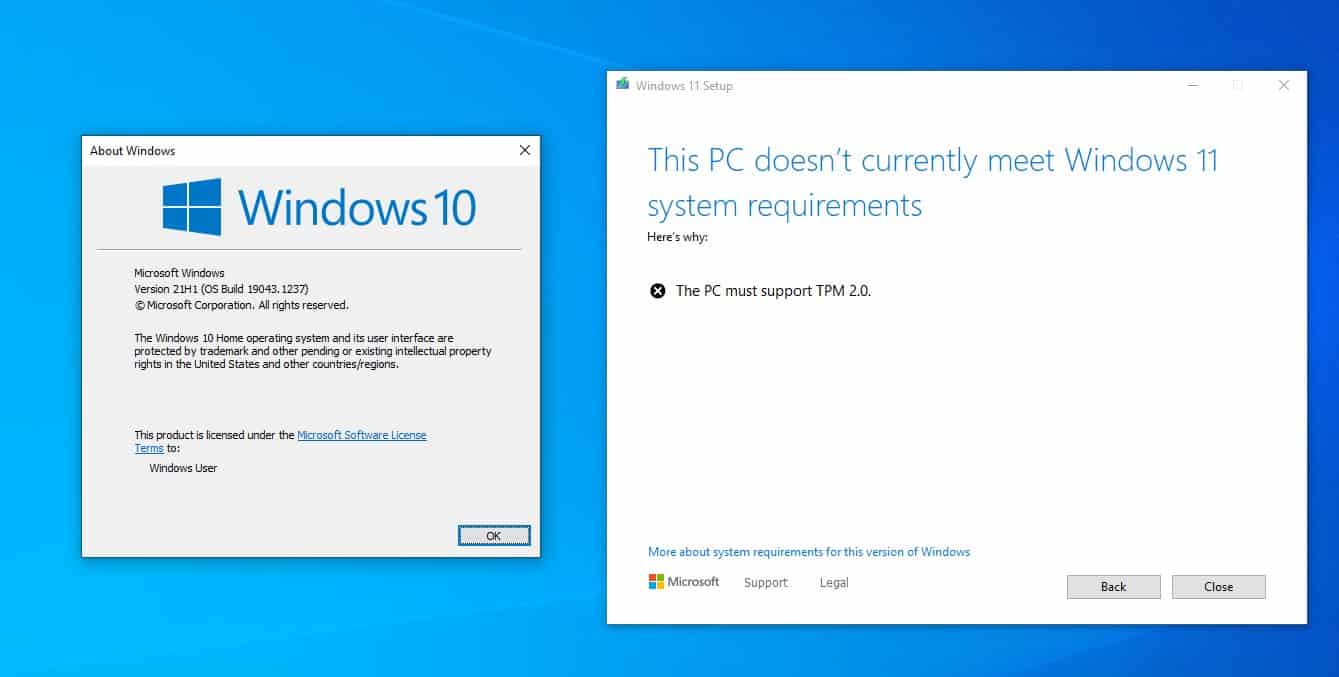
How to bypass TPM 2.0 requirement to install Windows 11

One of Windows 11's requirements is TMP 2.0 (Trusted Platform Module), it is a component that is present in Intel 8th generation CPUs, and AMD Ryzen 2nd-gen (2000 or above). If you have an older processor, it won't be compatible with the new OS, at least that's what the installer will tell you and the process fails.

Tip: find out whether your computer is compatible with Windows 11 using Microsoft's PC Health Check app.

Microsoft isn't saying that older processors won't be able to run Windows 11, just that it won't support the systems officially. So in reality, you can use Windows 11 on old computers. I've been using it on my free VMWare Workstation sans the TPM option, since the first build was leaked. Recent insider builds however blocked the installation due to the TPM check, but I bypassed this requirement quite easily.
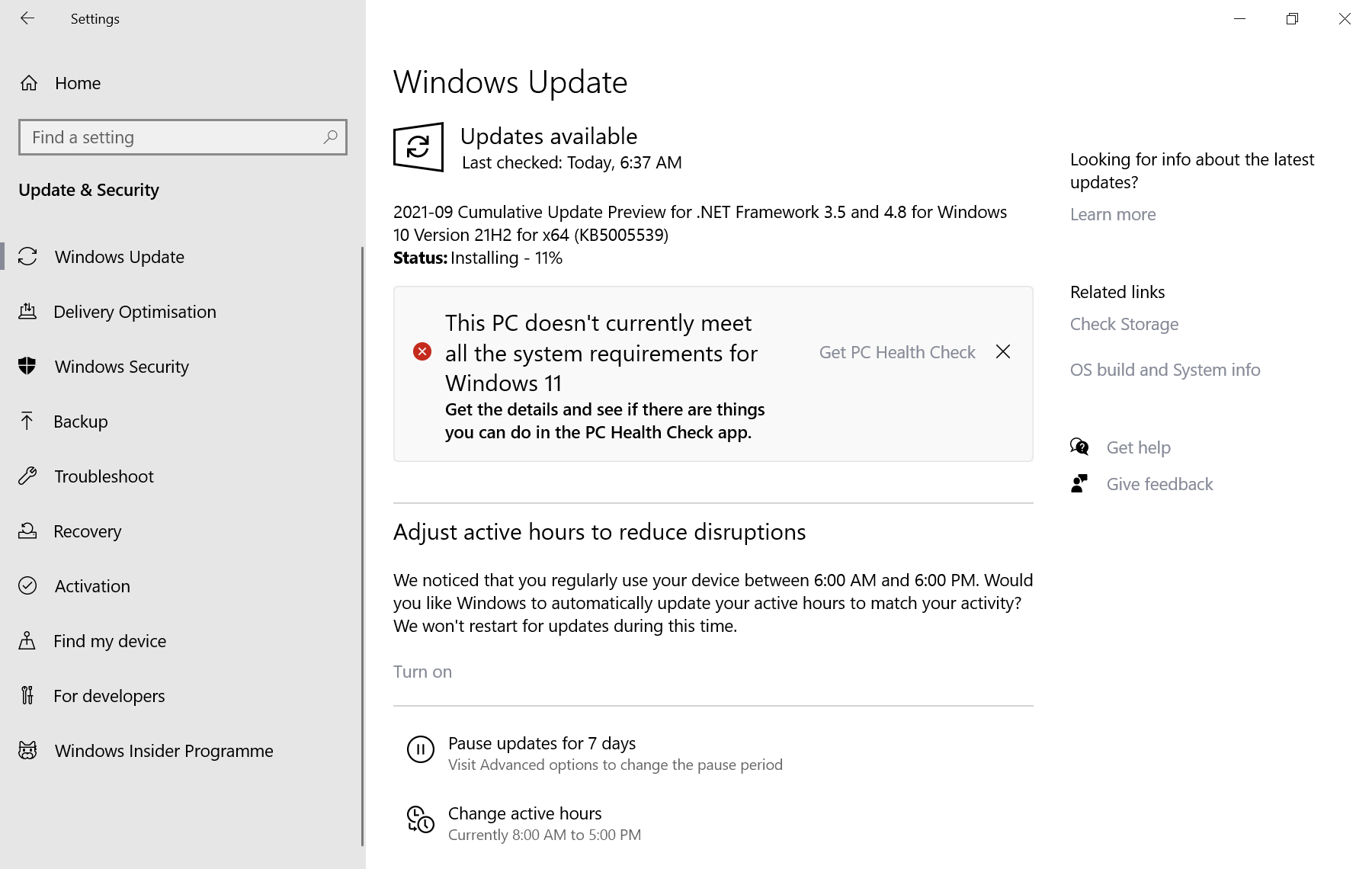
this pc doesn't currently meet all the system requirements for windows 11

Note: Windows Update displays a notification if the device is not compatible with Windows 11. It states the following: This PC doesn't currently meet all the system requirements for Windows 11. The notification links to Microsoft's PC Health Check tool, which offers more details on the incompatibilities.

You will need a copy of Windows 11, if you don't have one get the ISO, before following the steps below.  Here's how you can download Windows 11 safely.

Install Windows 11 on devices without TPM

Option 1 - Universal MediaCreationTool Wrapper

Note: Microsoft confirmed the bypass method to install Windows 11 that the tool uses officially.

1. Download the tool (use the download as ZIP button) and extract the archive's contents to a folder.

2. Open the directory, and select the file named Skip_TPM_Check_on_Dynamic_Update.cmd.

3. Right-click on it and select run as administrator.
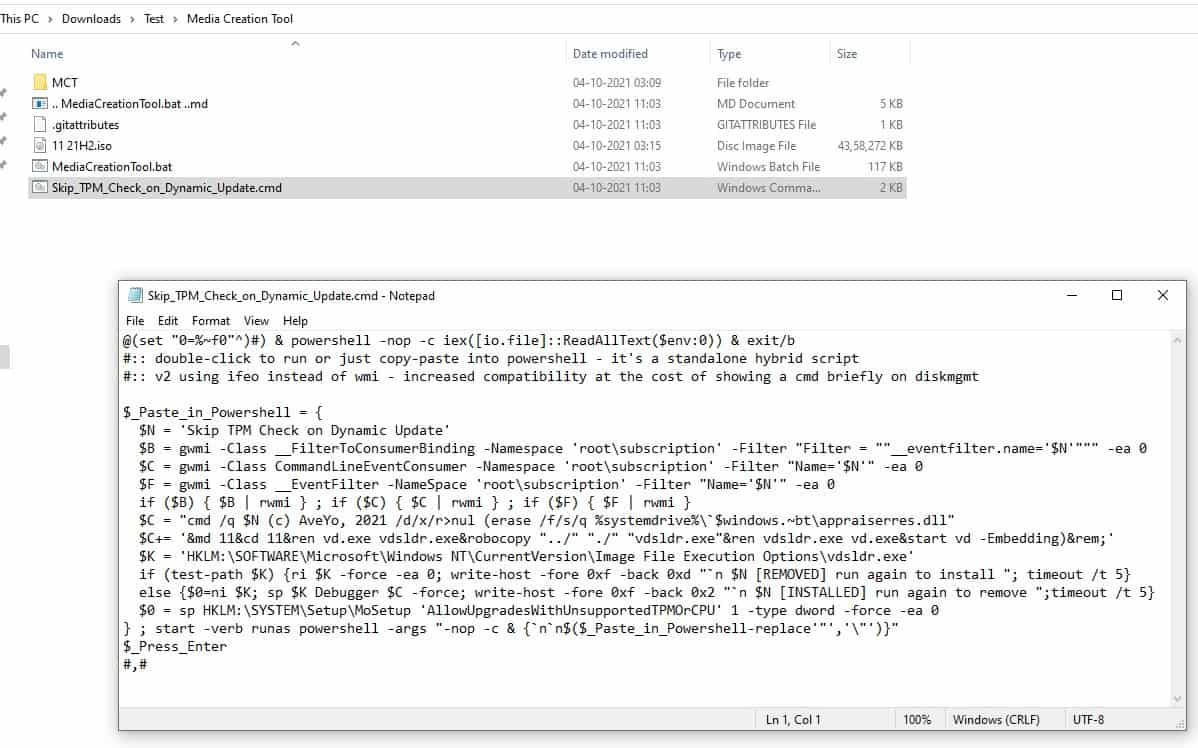
How to install Windows 11 without TPM 2.0

The command essentially does 2 things: it deletes a file called "appraiserres.dll", and creates a registry key that allows the installation of Windows 11 without TPM 2.0. This is by far the simplest method, and the one we recommend. Martin has written an article about the tool, which you can read for reference. It includes a wrapper for Microsoft's official Media Creation Tool as well, and you may run it to install Windows 11 using it on the device you are using.

Option 2 - Delete the Appraiser files

1. Mount the Windows 11 ISO in Explorer.

2. Copy the image's contents to a folder.

3. Navigate to the Sources folder, and delete the files named appraiser.dll and appraiser.sdb files.
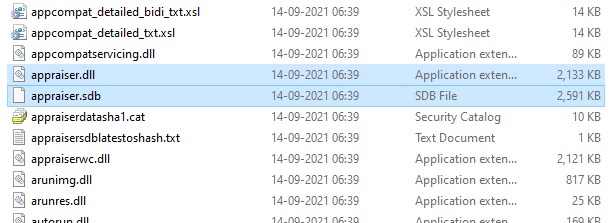
Windows 11 Delete appraiser files

Run the set-up, and it should bypass the TPM 2.0 check. If it still doesn't work, check the C:\$WINDOWS.~BT\Sources directory on your computer's drive, to see if it has the two files mentioned above, and delete them. This is the method that I used for upgrading my VM install of Windows 11 to a newer build.

Option 3 - Using Windows 10's files to install Windows 11

You will need an ISO for Windows 10, as well as one for Windows 11 for this method.
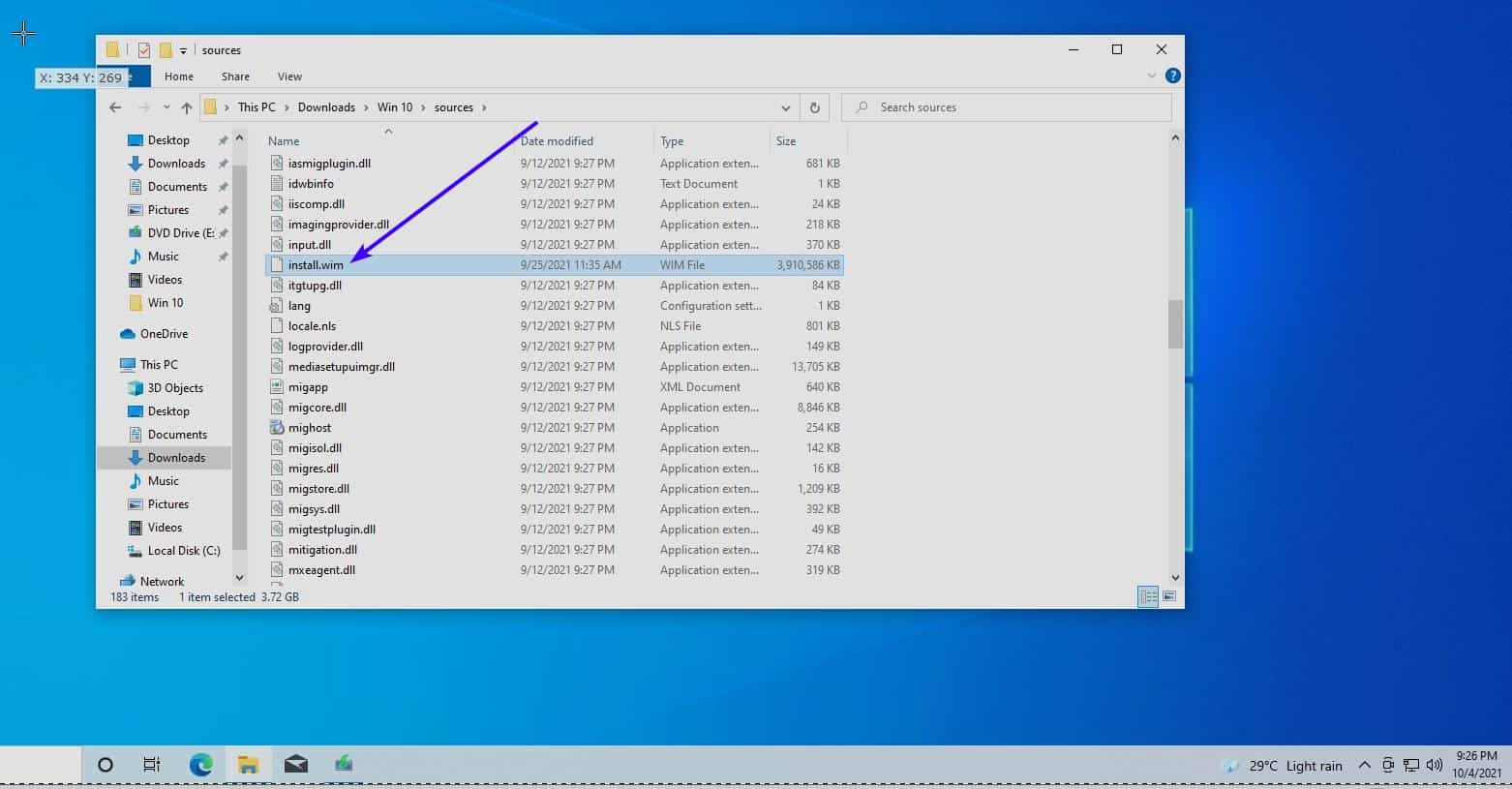
win 11 using win 10 install files

1. Open the Windows 10 ISO, and copy all the files in the source folder, except for the file named Install.ESD , to a separate folder.

2. Load the Windows 11 image in Explorer, copy the Install.WIM file to the folder where you copied the other content to.

3. Start the Windows 10 setup file. Yes it may sound crazy, but it tricks the setup into using Windows 10's requirements instead of Windows 11's, allowing your computer to pass the check.
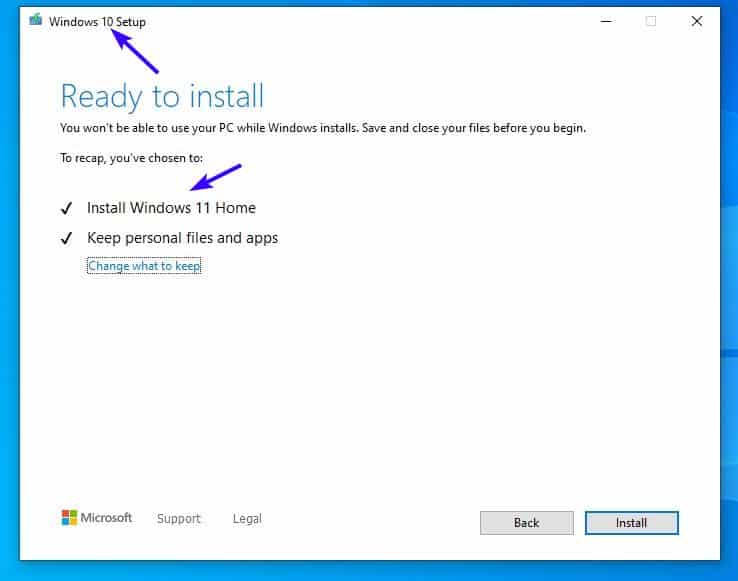
Install Windows 11 by replacing a Windows 10 file

I tested this in a new VM installation yesterday, and it still works.

Note: You need to have UEFI BIOS and Secure Boot enabled on your computer to install the new OS.

Do you have a different way to bypass the TPM 2.0 requirement to install Windows 11?

Summary
Learn how to install Windows 11 without TPM 2.0
Article Name
Learn how to install Windows 11 without TPM 2.0
Description
Don't have a TPM 2.0 compatible PC? You can still install Windows 11 using these methods.
Author
Publisher
Ghacks Technology News
Logo
Advertisement

Comments

  1. has-anyone-tried-this said on October 5, 2021 at 10:43 am
    Reply

    Is it possible to use offline accounts at all on Windows 11 Home?

    If an online account is needed to register the installation, would it be possible to set it up, create an offline admin account, remove the online one and use the offline account for the reminder of the system’s life?

    1. Martin Brinkmann said on October 5, 2021 at 10:47 am
      Reply

      Yes, offline accounts are supported on Windows 11 Home. I have not tried it, but there are workarounds to set up an offline account during Windows 11 Home installations, see here for example: https://www.extremetech.com/extreme/326879-how-to-install-windows-11-home-with-a-local-account

  2. flagada said on October 5, 2021 at 2:23 pm
    Reply

    Hi, I use Winreducer to easily manage what I want to keep or remove from the original .iso, but also edit the register and preset the first launch so that it won’t force/push me to use an online account, cortana etc. I create my local account in advance. Maybe that can help you make some settings of your choice – to trick Windows 11 for example.

  3. djdeejay said on October 5, 2021 at 3:14 pm
    Reply

    Method with appraiser not working on final version.

  4. semce said on October 5, 2021 at 3:42 pm
    Reply

    I installed Win 11 using a local account. I was asked to enter a MS log in to associate with my local account and after that it worked. I still use my local account on both my pcs. I may be wrong but I am concerned that using a MS account only would prevent me from logging on if the internet goes down. Comcast tends to drop on occasion.

  5. common sense computing said on October 5, 2021 at 4:46 pm
    Reply

    This isn’t a problem right away, but once MS starts putting the screws on 7-10 users, they will be forced to buy new hardware or purchase Windows 365 subscriptions.

    Right now the only people flocking to Win 11 are idiots, fanboys, and tech writers.

  6. xz69 said on October 5, 2021 at 8:12 pm
    Reply

    I got the message “this PC doesn’t currently meet all the system requirements for Windows 11” so I changed the BIOS to enable TPM. I went back to run PC Health Check app and it now says everything is fine for Windows 11. But when I go to Windows Update again I get the same “doesn’t meet the requirements” message. Any ideas as to what’s going on? Thanks

    1. EP said on October 6, 2021 at 12:54 am
      Reply

      @xz69 – consider using the ISO method like Ray here did. download the Win11 ISO image and run setup from the ISO install media instead of relying on windows update

  7. Ray said on October 5, 2021 at 9:09 pm
    Reply

    I didn’t have success with the cmd script with an older CPU processor. However, my PC did pass all the other requirements.

    What worked for me was simply downloading the full Windows 11 ISO and installing it over Windows 10. There’s an option where it asks you to that you’re using an old processor. You can just hit “Allow” and set up will complete.

  8. Go for it said on October 6, 2021 at 3:43 am
    Reply

    Step 1: Install Zorin OS 16
    Step 2: Install these https://www.gnome-look.org/p/1546069
    Step 3: Enjoy your fast, safe and personal computer

  9. Anonymous said on October 20, 2021 at 3:51 pm
    Reply

    Not doing anything, i was able to install Windows 11 ENT from a flash drive to a system w/o a compatible cpu, but had secure boot and tpm2. With the image created from this install i was able to get it running on systems without a compatible cpu or a TPM2 module though it will not run on systems w/o secure boot enabled. Uncertain if this is a work around or if this is expected behavior, no idea

  10. hhhgg said on November 16, 2022 at 8:14 am
    Reply

    TPM 2.0

Leave a Reply

Check the box to consent to your data being stored in line with the guidelines set out in our privacy policy

We love comments and welcome thoughtful and civilized discussion. Rudeness and personal attacks will not be tolerated. Please stay on-topic.
Please note that your comment may not appear immediately after you post it.

Monday, June 13, 2022

Saint Elisha, Prophet - From a sermon of St Ambrose, bishop

Saint Elisha, Prophet

From a sermon of St Ambrose, bishop


The healing of the waters, a type of the Church

What shall we say about the merits of Elisha? The first thing we praise him for is that he wanted to surpass his father [Elijah] in grace, for he asked for more than Elijah was able to bestow. Although he was greedy in his request, he was nonetheless worthy to have it granted. For while he demanded more from his father than Elijah had to give, through his own merits he enabled him to bestow more than he possessed.
  Following his master’s ascent, when Elisha arrived in Jericho, he was invited by the townspeople to remain with them; they said: this is an excellent site for the town, except that the water is bad and causes sterility. He then asked for a clay jar, filled it with salt, and went to the place where the water was coming up out of the ground; he threw it into the water saying: “Thus says the Lord: ‘I have purified these waters; never again shall death or sterility come from them.’” And those waters remain pure even to this day.
  So we see how remarkable Elisha’s merits are: in response to the citizens’ hospitality his very first gift to them was great fruitfulness. For by healing the water, he provided for their posterity. What he did was not for the benefit of any one person, or any one family: it was for all the people of the entire city. Had he delayed, they would all have been sterile and grown old without descendants, and the city would have been left deserted. Thus, by healing the waters Elisha healed the people; and by blessing the spring, he provided them as it were with a fountain of life. For just as through his blessing good water came forth from the unseen veins in the earth, so too from the seclusion of their wombs mothers gave birth to healthy children.
  For Elisha did not bless only the water that was already flowing into the spring’s basin, but rather all the water without distinction which was yet to flow little by little from the earth’s hidden moisture even until now. As Scripture has it, Elisha blessed the place where the water was coming up out of the earth, to indicate that it was the flowing water rather than the basin of the spring that he had sanctified. Thus, as the Apostle Paul says, all these things happened as signs; let us try to discover, therefore, the truth contained in this sign.
  The church is the sterile city which, before the coming of Christ, suffered from sterility due to the pollution of the waters – that is, to the idolatry of the gentiles – and was unable to bring forth children for God. But when Christ came and took on the fragile clay of the human body, he healed the pollution of the waters; that is, he banished the idolatries of the gentiles, and immediately the church, which had been sterile, began to be fertile.
  Thus the Apostle also says: Rejoice, you barren one who bear no children; break into song, you stranger to the pains of childbirth! For many are the children of the wife deserted-far more than of her who has a husband! For Christ brought to birth more children from the church which had been sterile than he had from the synagogue which had been fertile.


Sunday, May 1, 2022

Think Different - Noble Prize for transportation technology


This is actually a rhino, hanging upside down from its ankles, being dangled by a helicopter.


Your first thought might be that this is horrendous! The poor animals are going to be severely hurt! Surely, this must be the work of someone without a soul.

Nope, this is a science experiment, being funded by Namibian Ministry of Environment. And it’s actually helping them to save the rhino population from dwindling even more.

You see, due to widespread poaching of these animals, their populations have become very low, with most of the animals being concentrated in places like national parks and wildlife reserves. However, there’s a problem which arises due to this high concentration - inbreeding.

Rhinos, unable to find mates from outside, have to resort to mating among their own gene pool. This, of course, leads to a lot of problems - none of which are good for the rhino population.

Because of this, groups dedicated to preserving these majestic beasts have been shifting rhinos away from their families when they reach maturity, so that they can reproduce outside their own gene pool, and prevent inbreeding.

https://qph.fs.quoracdn.net/main-qimg-1ecc16ebeb51cc19d32d9c63fba79abd-lqAs to how they performed this shifting?

The rhinos were tranquilized, before being secured in box. This box, containing the rhino lying in it, was then flown to other regions by helicopters.

However, analysis showed that this position was quite harmful to the rhinos.

In this position, the muscles of the side on which they were lying, get damaged. These muscles are simply unable to handle their immense weight.

Their lungs also suffer. I don’t exactly get how, but from what I understood, its due to the imbalance of oxygen supply to the two lungs. The one on the lying side gets a lot of oxygen, but the one facing the sky gets too little.

And here enters the hero of our story, Robin Radcliffe, a wildlife veterinarian from Cornell Uni. He proposed that instead of being carried on their side, the rhinos should be hung from their ankles (Ya, I don’t get it either)

This sounds like an insane idea, and it is! But much to everyone’s surprise, his solution actually was proven to be better than the previous method.

He and his colleagues showed the effectiveness of this method by transporting 12 tranquilized black rhinos with the help of the Namibian Ministry of Environment.


In fact, the guy’s idea was so ridiculous, yet effective, that he won the ig-nobel prize for transport technology this year!

The motto of the ig-noble prize is: “Research that makes people laugh and then think”.

And I must say, if there’s any piece of research which deserves this prize, its this one.

https://qr.ae/pv2Lsd


Wednesday, April 20, 2022

Can I use 4G LTE (Cellular Data) and Airplay using Wifi w/ No Internet connection at the same time?

I migliori speaker AirPlay 2 e i trucchi per portare ... 

Basically, use a static configuration for your WiFi Network, but leave the Router IP address blank. The LTE icon will be displayed, and the mobile network used for all non-local traffic (ie, Internet) but you will still be connected to the WiFi network can can use all local LAN resources.

Get a Generic router or access point, connect your phone to the wifi signal (sometimes it takes a while because it says no internet, after a bit it asks you if you want to continue without internet, say yes); connect your apple TV to the same access point. On your PHONE, go into Settings - WiFi, and select the network you are connecting to without internet, then select the little 'i' on the right. Then select "Static". Set IP address to 10.0.1.4 and subnet mask to 255.255.0.0

Leave all other blank.

This will ensure your phone looks to cellular for internet connection, but allows the wifi necessary for AirPlay. Just make sure you have a fast enough wifi access point/router or you'll have trouble. Also, some apps WANT wifi internet to work right.

Monday, April 11, 2022

Turn your website into an app!

How to Turn your website into a smarphone app (Android/iOS)

 https://guruhitech.com/trasforma-il-tuo-sito-in-app-con-gonative/ 

Trasforma il tuo sito in app con GoNative

Hai un sito che utilizzi spesso e vorresti convertirlo in app? Con GoNative potrai farlo in meno di 5 minuti e senza essere un grande esperto di informatica.

Uno degli aspetti più interessanti di GoNative è che è del tutto gratuito, non richiede nessuna registrazione e puoi creare un file installabile sia per Android che per iOS. Potrai inoltre scaricare il tuo codice sorgente e modificarlo con Android Studio o altri software di programmazione compatibili.

In questo articolo ti mostrerò i passaggi principali per convertire qualsiasi sito in un app, per impostare un’icona e altri utili consigli.

Come trasformare un sito in App
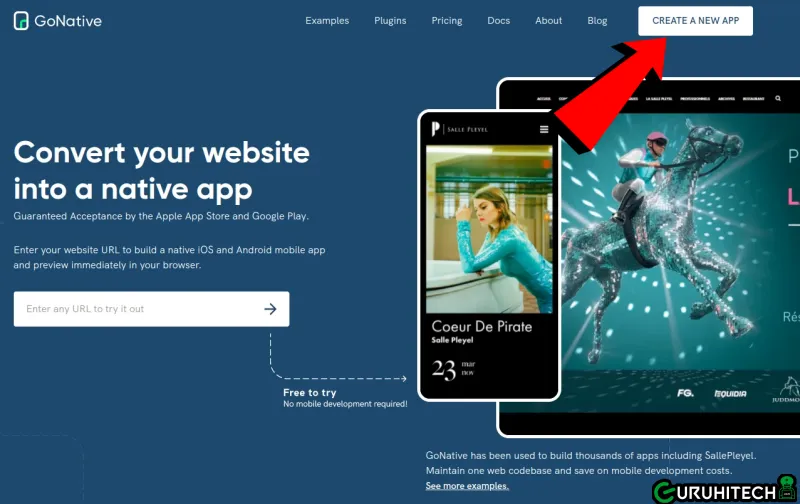
  • Visita il sito gonative.io e clicca in alto a destra su CREATE A NEW APP.
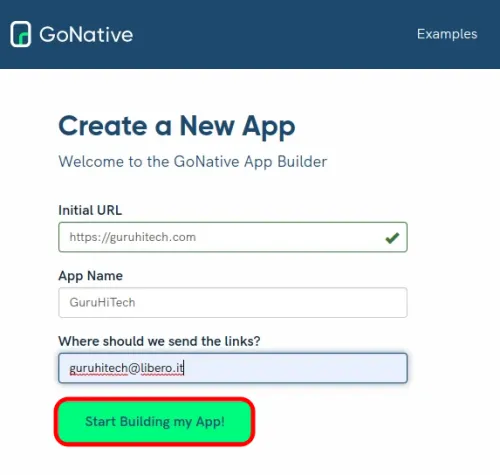
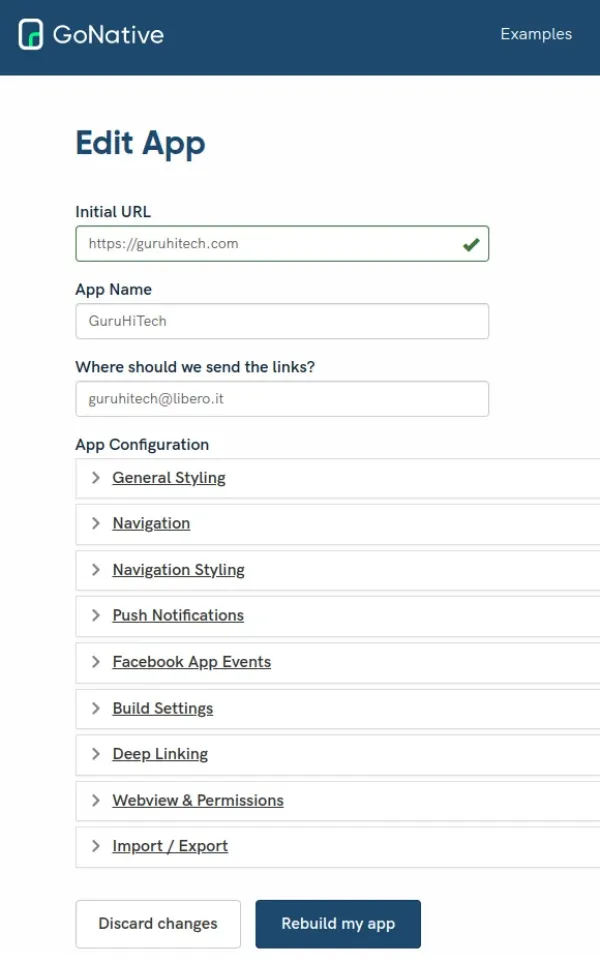
  • Inserisci l’indirizzo del sito che vuoi convertire (Initial URL), il nome (App Name) e l’indirizzo email nel quale vuoi che ti venga inviato il link di GoNative.
  • Clicca su Start Building my App! per continuare.
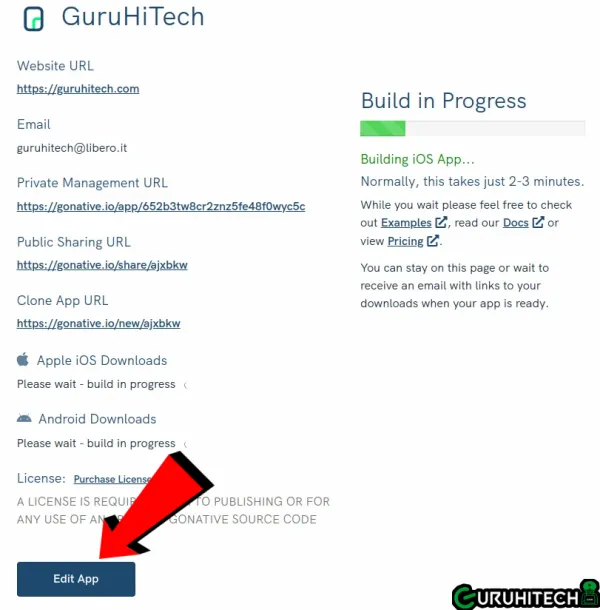
  • A questo punto inizierà subito la costruzione del file ma a me personalmente interessa anche inserire un’icona. Per questo clicco in basso a sinistra su Edit App.
  • Nella pagine dell’editor, oltre all’icona potrai settare anche altre impostazioni.
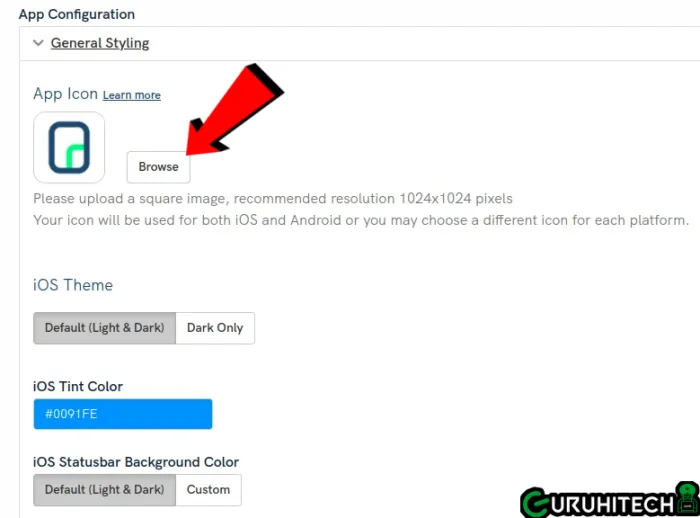
  • Clicca su General Styling e su Browse per caricare la tua icona.
  • In questa pagina potrai trovare tante altre belle impostazioni come Navigazione, Notifiche Push e WebView
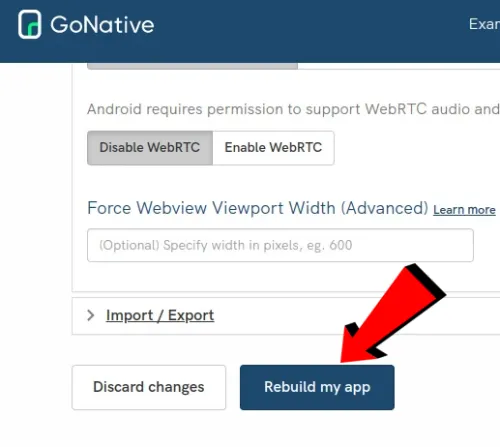
  • Quando avrai impostato al meglio tutti i parametri, clicca su Rebuild my app.
  • Attendi qualche minuto per la ricostruzione dell’app.
  • Ora avrai tutti i link per scaricare il codice sorgente sia per Android che per iOS e naturalmente anche del file APK per Android.
  • Fatto! 😎

IMPORTANTE: le app create con GoNative occupano pochissima memoria. Con le impostazioni base che ho elencato, il file si aggira intorno ai 4 MB.

Monday, March 21, 2022

Napoleon Bonaparte - Leader Earns Trust....


Emperor Napoleon I often made some actions which were inexplicable even from the point of view of his generals. Late at night he could slip his cloak over the shoulders, put on his famous cocked hat and without any convoy went to inspect posts.

Once during this inspection the emperor saw a sentry who was sleeping on his post. Military time regulations were very strict, but fair: the punishment for such breach was an immediate field court and shooting. A sleeping soldier on his post exposed to danger not only himself, but his companions’ lives which he was guarded. But Napoleon, as always, behaved very paradoxically. He took a heavy gun of the sleeping sentry and stood on the post. When some time later a guard commander came with changing of the guard, he saw to his surprise and horror that the sentry was peacefully sleeping under the bush and his place was occupied by the emperor.

“Stop! Who’s there?” – Napoleon asked according to regulations, taking the gun from his shoulders.

Taken aback from such view soldiers even broke formation watching the emperor on the post. The guard commander some time later collected himself and answered: “Changing of the guard! Go off duty!”

“Gone of duty!” – Napoleon reported soldierly and then said in absolutely other voice: “Don’t wake the soldier! Let him have enough sleep.”

There wasn’t any punishment for the sentry.

When Norman Copeland was writing his famous book “Psychology of direction” he repeatedly took examples from history. Particularly when he was explaining methods of group’s rallying around the leader he gave this case from Napoleon.